Recently the indian rupee joined the elite league of currencies that have their own unique symbol. The symbol is a combination of the devanagri ‘ra’ and also symbolises the roman letter R. the two stokes signifies the tricolour and the progress of the nation. here’s how u can use it in your emails and word documents.
Given below are the steps to use the new Indian Rupee Symbol as a Font in your word applications:
1. Download the attached font Rupee.ttf or Rupee_Foradian.ttf
2. Copy the font and paste it in “Fonts” folder in Control Panel.
3. Open any Microsoft Office application (For E.g., Microsoft Office Word). (See Figure 1.a)
4. Select the font type as Rupee or Rupee Foradian.
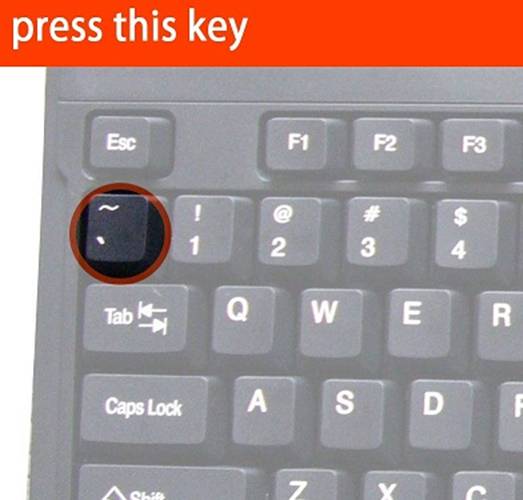
5. Click on ` (Grave accent) symbol. This key is just above “tab” button in your keyboard. (See figure 2)
6. You can see the new Rupee symbol in your office application.
Figure 1.a. Rupee Symbol in MS word
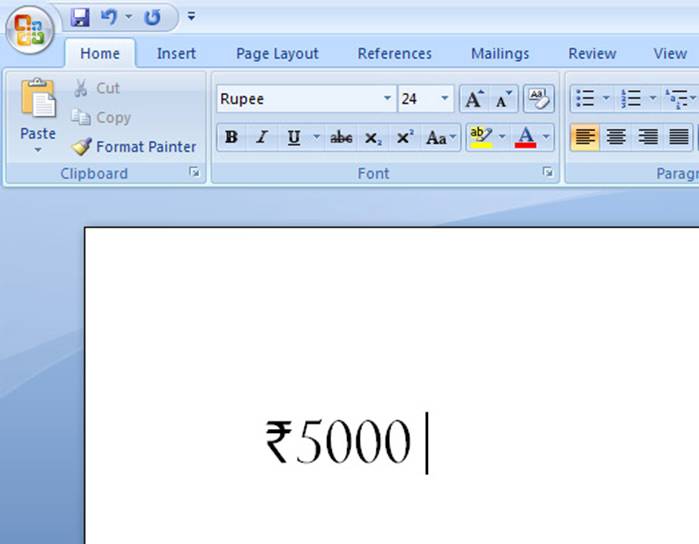
Figure 1.b. Rupee Symbol in Gmail application
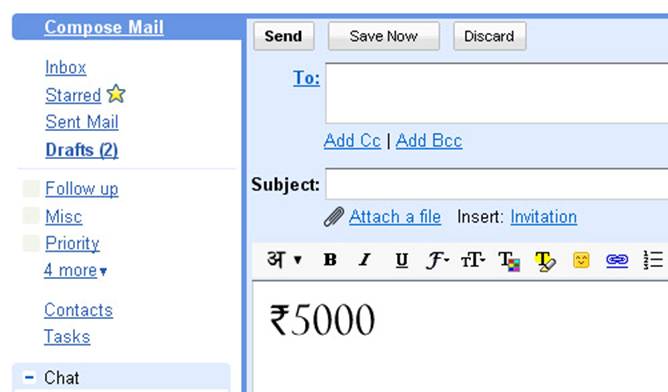
Figure2. Grave Accent Symbol
Limitations:
The “Rupee.ttf” font is necessary to view the currency symbol. So as long as the new symbol is not encoded in to Unicode font by default,
we cant use the symbol universally.
Thanks to Foradian Technologies for giving these fonts as a free download to public

 Murli's Blog
Leave a comment